Your sound deserves a scene. Put yourself in the picture with a ready-made look, or imagine a visual world for your own music video on iPhone and iPad.
A cinematic rainy-city music video about finding connection across the night, shifting from midnight blue to warm amber.
A fictional performer sings in a midnight-blue city. Rainy streets and reflections lead into a warm amber close-up.
We are satellites in the rain
Shining bright through the mist and pain
Spinning close in the quiet space
Finding home in a cold embrace
Yeah, we are satellites in the rain
TEMPLATE CLIP · 20 SEC
Electric Morning
Pop / house · Female vocal
The idea, lyrics & scene
Video input
The Electric Morning chorus + a synthetic demo avatar. Rooftop Sunset · 20 seconds · Lyrics off.
A fictional performer in a purple dress sings on a rooftop, with a city skyline behind her in the sunset.
We make our own electric morning
We make our own electric morning
We don't need the sun to rise
We got the fire in our eyes
We make our own electric morning
Start with an eligible finished song. Choose a Template clip for a ready-made look or a Custom music video for more creative direction.
02
Make it personal
Use your own adult self-portrait and complete the in-app permissions checks. Select the song range and quality; add a creative brief for a custom video.
03
Review, create, share
Review the credit cost before each paid stage. For custom videos, refine the look and storyboard before rendering. Export the finished video for personal sharing.
TRY AN IDEA OF YOUR OWN
How to turn your song into an AI music video
Choose Template clip for a vocal performance in a ready-made environment. Choose Custom music video when you want to describe a visual world and refine the look and storyboard before rendering.
A quiet city rooftop at blue hour, warm window lights behind the performer, gentle camera movement, and a hopeful mood that builds with the chorus.
Open an eligible finished song and choose Video. Use your own adult self-portrait and complete the in-app consent and image-rights checks. Select the song range you want to use.
For a Template clip, choose an environment, a 10–60 second vocal excerpt, and 480p or 720p quality. For a Custom music video, describe the setting, mood, and movement; a vocal or instrumental song can be used.
Review each credit quote before confirming. In the custom workflow, review the proposed look and storyboard and refine shots before the final render. Watch the completed video, then export it for personal sharing.
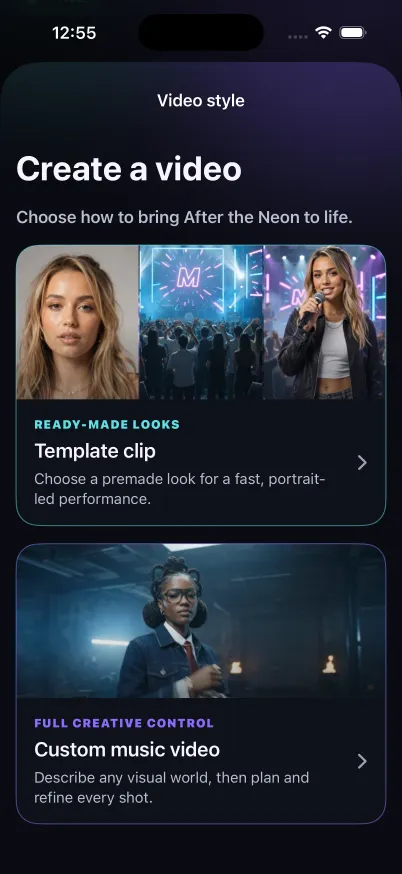
Template clip
Choose from five ready-made environments for a portrait-led performance of a vocal song. Select a 10–60 second excerpt and 480p or 720p quality.
Custom music video
Describe a visual world for a vocal or instrumental song. Review its look and storyboard, refine individual shots, then confirm the final render.
A little more of you in the frame.
Both modes use your own consented self-portrait. Export a vertical video, with an optional karaoke version when a compatible vocal timeline is available.
A FEW THINGS TO KNOW
Good questions.
A little clarity before your next idea.
Can I use someone else’s portrait?+
No. These features are for your own self-portrait as an adult aged 18 or older. You must have the required image rights and complete the consent checks in the app.
How are music videos priced?+
MUVO shows a credit quote before each paid action. A custom video has separately confirmed planning, storyboard, and rendering stages; regenerating a look, frame, or shot can have its own charge.
Will my video look exactly like the preview?+
AI results vary. Artwork and illustrative teasers show a creative direction, not a guarantee of the final result or an exact likeness.
PLAY MORE. FEEL MORE.
See where your next idea takes you.
Make a song. Find a new version. Bring it to life.
With your permission, we use Google Analytics to understand visits and interactions. Accept all also allows Google advertising cookies and data use for ad measurement, personalization and remarketing. You can change your choice in Cookie settings. Website privacy and cookies.