On iPhone & iPad. For personal, noncommercial creativity.
MADE WITH MUVO
Same song. A different mix.
Compare Electric Morning’s original chorus with its instrumental, made by muting the vocals in MUVO Remix. Playback levels are matched for this comparison.
We make our own electric morning
We make our own electric morning
We don't need the sun to rise
We got the fire in our eyes
We make our own electric morning
Open a finished Library song or import a WAV, M4A, or MP3 recording you have permission to use.
02
Find your balance
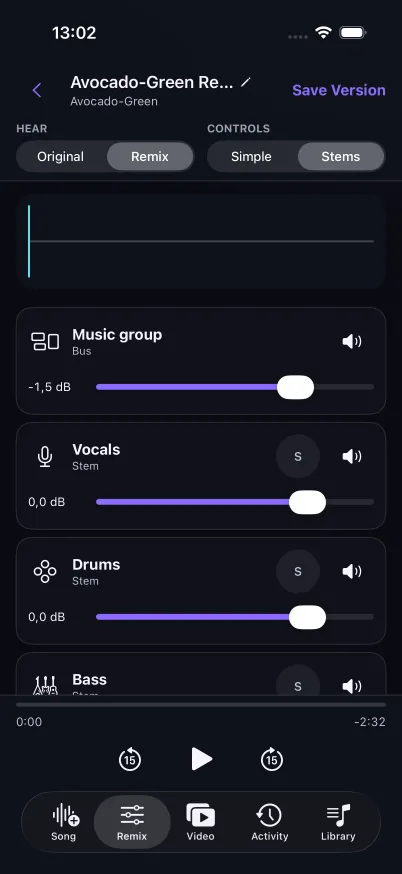
Separate the source into vocals and instruments. Work with a simple vocal/music mix or explore the individual tracks in Stems mode.
03
Make another version
Adjust levels, pan, and mute, or add a generated instrument. Save the mix as a new Library version while keeping its source.
TRY AN IDEA OF YOUR OWN
How to separate vocals and make a new mix
Use Simple mode when you want to rebalance a voice against the backing music. Use Stems mode when you want control over individual instrument tracks. Both modes work from the same separation.
Take a recording you are allowed to process and try a quieter backing track with a more prominent vocal. Compare that version with a mix that brings the bass forward instead.
Open a finished Library song, or import your own permitted WAV, M4A, or MP3 file. Complete the rights and processing checks before uploading. Imports can be up to 50 MiB and ten minutes.
Review the separation quote and confirm. In Simple mode, lower Music to hear Vocals more clearly. In Stems mode, use mute or solo to hear each part, then adjust levels and pan. Separation quality varies with the source.
To add an instrument, describe the part and choose the whole song or a selected range. Review its separate credit quote before generating, then blend it into your mix. Save the mix as a new Library version; your source remains available.
Start simple. Go deeper.
Simple mode gives you Vocals and Music. Stems mode opens up vocals, drums, bass, guitar, piano, and other instruments from the same separation.
Hear what one change can do.
Adjust volume and pan, mute or solo a part, and compare as you listen. Your mix stays under your control.
A new part, a new direction.
Describe an instrument part for the full song or a selected range. Review its credit quote before generating it, then blend the new track into your mix.
A FEW THINGS TO KNOW
Good questions.
A little clarity before your next idea.
What audio can I import?+
MUVO accepts WAV, M4A, and MP3 sources up to 50 MiB and ten minutes. Only import recordings you have the rights and permissions to upload and process.
Which remix actions use credits?+
Audio separation and generating new instrument parts can use credits. MUVO shows the applicable quote before you confirm each paid action. Changing between Simple and Stems uses the same separated tracks.
Does a remix replace my original?+
No. Saving a remix creates a new Library version associated with its source, so you can keep exploring different mixes.
PLAY MORE. FEEL MORE.
See where your next idea takes you.
Make a song. Find a new version. Bring it to life.
With your permission, we use Google Analytics to understand visits and interactions. Accept all also allows Google advertising cookies and data use for ad measurement, personalization and remarketing. You can change your choice in Cookie settings. Website privacy and cookies.